Get Started
Note
Make sure you have a working installation before proceeding.
Hello Tesseract
The tesseract CLI builds Tesseracts as Docker containers from tesseract_api.py files. Here, we’ll build and invoke a simple Tesseract that greets you by name.
Build your first Tesseract
Download the Tesseract examples and run the following command from where you unpacked the archive:
$ tesseract build examples/helloworld
 [i] Building image ...
 [i] Built image sha256:95e0b89e9634, ['helloworld:latest']
Tip
Having trouble? Check common issues for solutions.
Your first Tesseract is now available as a Docker image on your system.
Run your Tesseract
You can interact with any built Tesseract via the CLI, the REST API, or the Python SDK:
$ tesseract run helloworld apply '{"inputs": {"name": "Osborne"}}'
{"greeting":"Hello Osborne!"}
$ tesseract serve -p 8080 helloworld
 [i] Waiting for Tesseract containers to start ...
 [i] Container ID: 2587deea2a2efb6198913f757772560d9c64cf8621a6d1a54aa3333a7b4bcf62
 [i] Name: tesseract-uum375qt6dj5-sha256-9by9ahsnsza2-1
 [i] Entrypoint: ['tesseract-runtime', 'serve']
 [i] View Tesseract: http://127.0.0.1:56489/docs
 [i] Docker Compose Project ID, use it with 'tesseract teardown' command: tesseract-u7um375qt6dj5
{"project_id": "tesseract-u7um375qt6dj5", "containers": [{"name": "tesseract-uum375qt6dj5-sha256-9by9ahsnsza2-1", "port": "8080"}]}%

$ # The port at which your Tesseract will be served is random if `--port` is not specified;
$ # specify the one you received from `tesseract serve` output in the next command.
$ curl -d '{"inputs": {"name": "Osborne"}}' \
       -H "Content-Type: application/json" \
       http://127.0.0.1:8080/apply
{"greeting":"Hello Osborne!"}

$ tesseract teardown tesseract-u7um375qt6dj5
 [i] Tesseracts are shutdown for Project name: tesseract-u7um375qt6dj5
>>> from tesseract_core import Tesseract
>>>
>>> with Tesseract.from_image("helloworld") as helloworld:
>>>     helloworld.apply({"name": "Osborne"})
{'greeting': 'Hello Osborne!'}
Tip
For faster iteration during development, you can run Tesseracts without building containers. See Debugging and Development for details.
Each Tesseract auto-generates CLI and REST API docs. To view them:
$ tesseract run helloworld --help
$ tesseract apidoc helloworld
 [i] Waiting for Tesseract containers to start ...
 [i] Serving OpenAPI docs for Tesseract helloworld at http://127.0.0.1:59569/docs
 [i]   Press Ctrl+C to stop
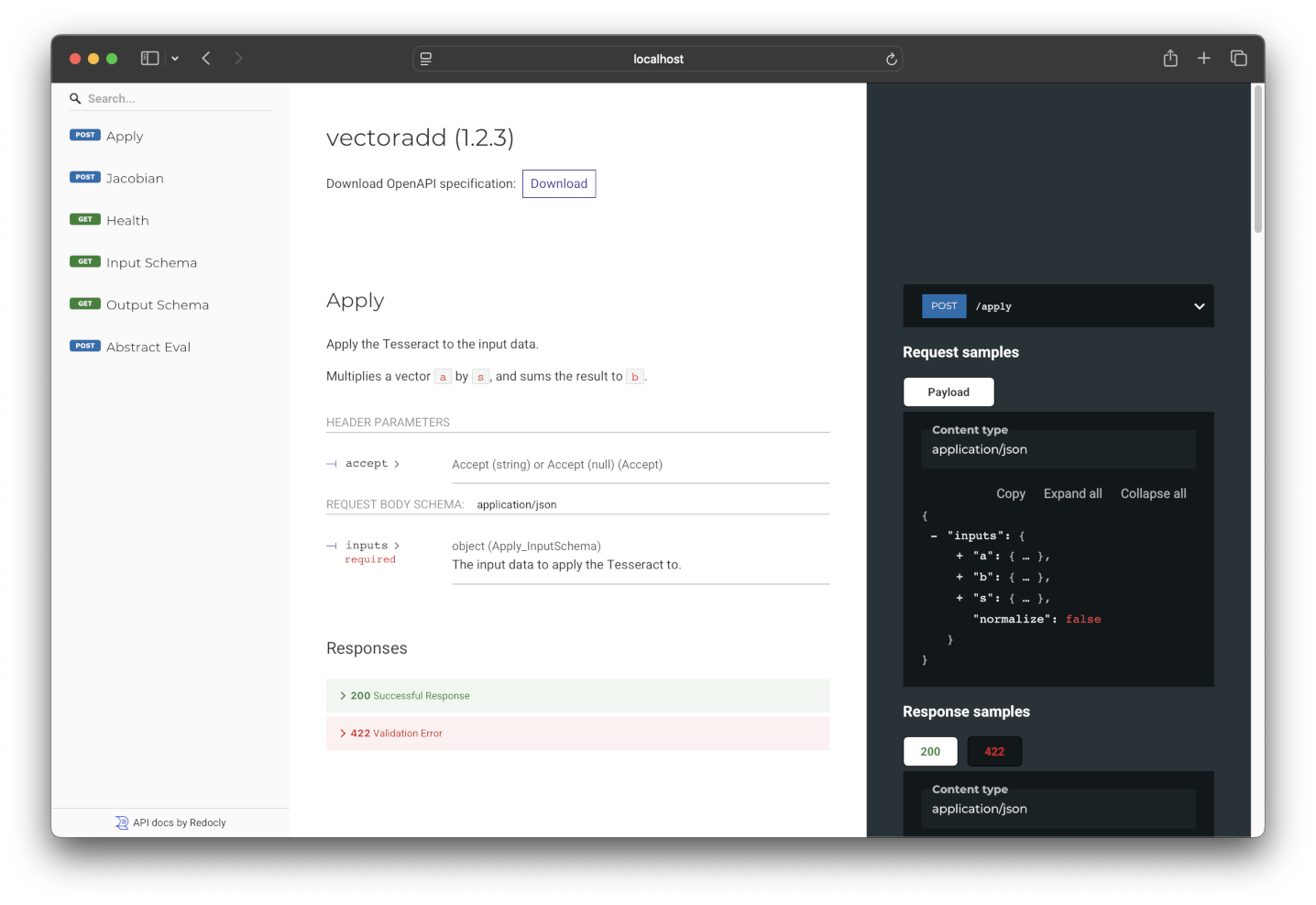
The OpenAPI docs for the helloworld Tesseract, documenting its endpoints and valid inputs / outputs.
Under the hood
The folder passed to tesseract build contains three files:
$ tree examples/helloworld
examples/helloworld
├── tesseract_api.py
├── tesseract_config.yaml
└── tesseract_requirements.txt
These are all that’s needed to define a Tesseract.
tesseract_api.py
This file defines the Tesseract’s input and output schemas, along with the endpoint functions: apply, abstract_eval, jacobian, jacobian_vector_product, and vector_jacobian_product (see endpoints). Only apply is required.
class InputSchema(BaseModel):
    name: str = Field(description="Name of the person you want to greet.")
class OutputSchema(BaseModel):
    greeting: str = Field(description="A greeting!")
def apply(inputs: InputSchema) -> OutputSchema:
    """Greet a person whose name is given as input."""
    return OutputSchema(greeting=f"Hello {inputs.name}!")
Tip
For a Tesseract that has all optional endpoints implemented, check out the Univariate example.
tesseract_config.yaml
Contains metadata such as the Tesseract’s name, description, version, and build configuration.
name: "helloworld"
version: "1.0.0"
description: "A sample Python app"

build_config:
  # Base image to use for the container, must be Ubuntu or Debian-based
  # base_image: "debian:bookworm-slim"

  # Platform to build the container for. In general, images can only be executed
  # on the platform they were built for.
  # target_platform: "native"

  # Additional packages to install in the container (via apt-get)
  # extra_packages:
  #  - package_name

  # Data to copy into the container, relative to the project root
  # package_data:
  #  - [path/to/source, path/to/destination]

  # Additional Dockerfile commands to run during the build process
  # custom_build_steps:
  #  - |
  #   RUN echo "Hello, World!"
tesseract_requirements.txt
Lists the Python packages needed to build and run the Tesseract, in pip requirements file format.
Note
This file is optional. tesseract_api.py can invoke functions written in any language. In that case, use the build_config section in tesseract_config.yaml to provide data files and install dependencies.
# Add Python requirements like this:
# numpy==1.18.1
Next steps
Depending on your needs:
Creating Tesseracts — define schemas, implement endpoints, and build Tesseracts
Interacting with Tesseracts — invoke Tesseracts and work with their outputs
Or jump into end-to-end tutorials: