Array Encodings
Tesseract supports three encoding formats for array data. The encoding determines how numeric arrays are represented in the JSON payload exchanged between client and server, for both inputs and outputs.
Available formats
Arrays are serialized as nested JSON lists. Human-readable but slow and memory-intensive for large arrays.
{
  "object_type": "array",
  "shape": [3],
  "dtype": "float64",
  "data": [1.0, 2.0, 3.0]
}
Binary array data is base64-encoded and embedded in JSON. Good balance of efficiency and portability.
{
  "object_type": "array",
  "shape": [3],
  "dtype": "float64",
  "data": {
    "buffer": "AAAAAAAA8D8AAAAAAAAAQAAAAAAAAAhA",
    "encoding": "base64"
  }
}
Array data is stored in separate binary files, with JSON containing only references. Most efficient for large data.
{
  "object_type": "array",
  "shape": [1000000],
  "dtype": "float64",
  "data": {
    "buffer": "arrays/output_0.bin:0",
    "encoding": "binref"
  }
}
Which format should I use?
Format |
Description |
Best For |
|---|---|---|
json |
Arrays encoded as nested JSON lists |
Debugging, human-readable output. Avoid for large arrays |
base64 |
Binary data encoded as base64 strings in JSON |
General-purpose default for HTTP transport |
binref |
References to binary files on disk |
Large arrays (>10MB), when disk I/O is preferable over HTTP, when data is written to disk anyway |
The chart below shows how encoding format affects serialization and transfer overhead as array size grows. For more on overall Tesseract performance trade-offs, see Performance Trade-offs & Optimization.
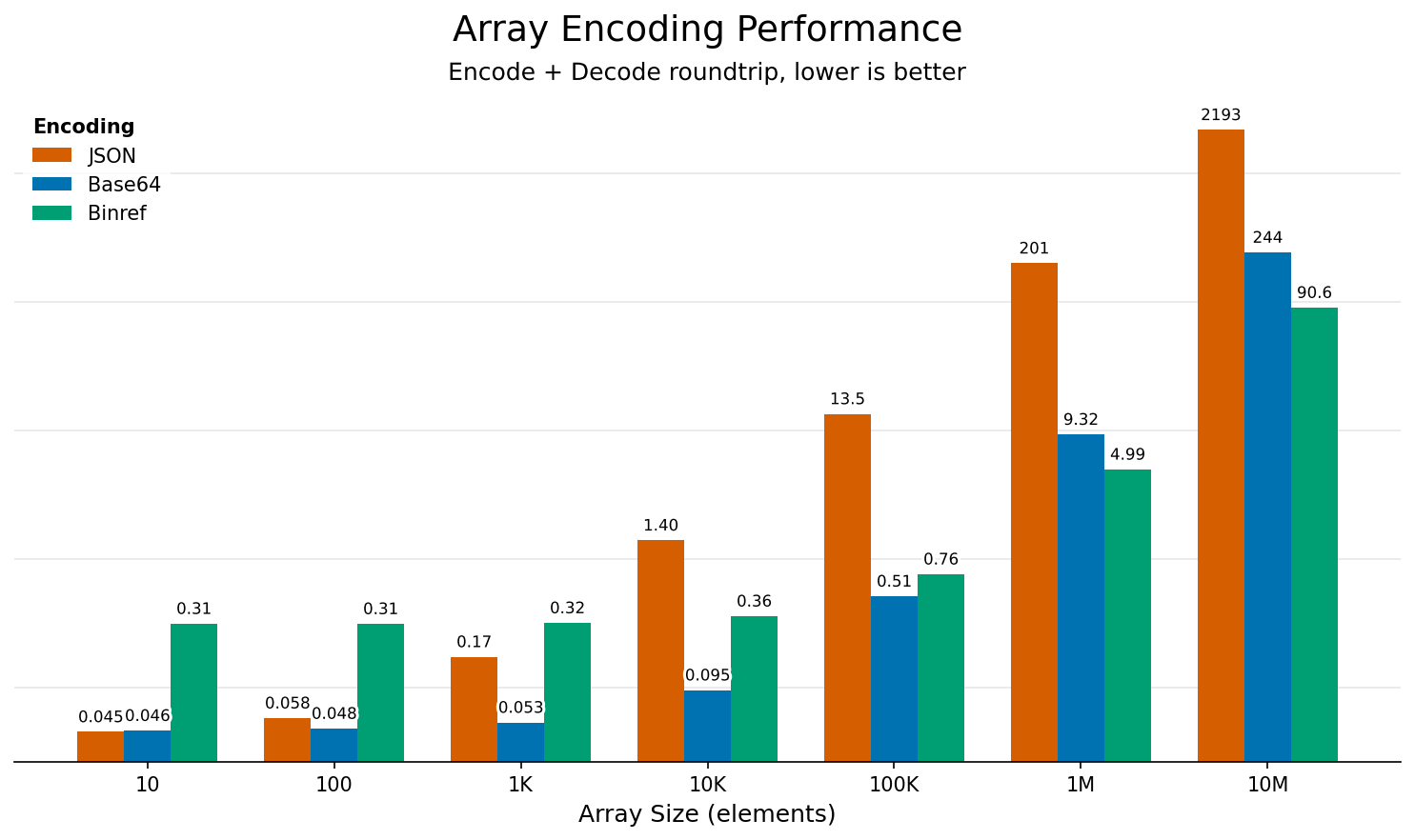
Serialization and transfer overhead by encoding format and array size.
Usage
The default format is json. To use a different encoding, set the format flag:
base64
$ tesseract run vectoradd apply -f "json+base64" @examples/vectoradd/example_inputs_b64.json
{"result":{"object_type":"array","shape":[3],"dtype":"float64","data":{"buffer":"AAAAAAAALEAAAAAAAAA2QAAAAAAAAD5A","encoding":"base64"}}}
$ curl \
  -H "Accept: application/json+base64" \
  -H "Content-Type: application/json" \
  -d @examples/vectoradd/example_inputs.json \
  http://<tesseract-address>:<port>/apply
{"result":{"object_type":"array","shape":[3],"dtype":"float64","data":{"buffer":"AAAAAAAALEAAAAAAAAA2QAAAAAAAAD5A","encoding":"base64"}}}
binref
The json+binref format stores array data in separate .bin files and puts only references in the JSON. This enables lazy loading via LazySequence. See the Array docstring for more details.
$ tesseract run vectoradd apply -f "json+binref" -o /tmp/output @examples/vectoradd/example_inputs.json

$ ls /tmp/output
7796fb36-849a-42ce-8288-a07426111f0c.bin results.json

$ cat /tmp/output/results.json
{"result":{"object_type":"array","shape":[3],"dtype":"float64","data":{"buffer":"7796fb36-849a-42ce-8288-a07426111f0c.bin:0","encoding":"binref"}}}
Specify --output-path when serving so the .bin files are accessible on the host. Otherwise they’re only available inside the container (under /tesseract/output_path).
$ tesseract serve <tesseract-name> --output-path /tmp/output
$ curl \
  -H "Accept: application/json+binref" \
  -H "Content-Type: application/json" \
  -d @examples/vectoradd/example_inputs.json \
  http://<tesseract-address>:<port>/apply
The .bin file references are relative to the --output-path.