Performance trade-offs & optimization
The short version
Compare the overhead of one call with the time the call itself takes. On one machine, a call to a served Tesseract costs a few milliseconds plus the time to move its arrays (see the measurements below). If each call computes for a second or more, that overhead is noise and you can stop reading. If it computes for about as long as the overhead, or less, then the overhead dominates, and you have three options, in order of preference:
Make each call cheap. Keep one instance alive for all calls, do expensive setup once at module level (see Keep expensive setup out of the call), and keep the payload per call small. On one machine,
json+binrefon shared memory passes large arrays without encoding them into the request body (see Fast same-machine runs with shared-memory binref), and the experimental GPU transport passes arrays that are already on a GPU without copying them to the host (see Choosing the encoding per request).Do more work per call. Batch independent inputs into one request (see Batch small operations).
Drop the process boundary. Load the Tesseract in-process with
Tesseract.from_tesseract_api, which costs about half a millisecond per call but needs all of its dependencies in your environment.
Warning
An in-process Tesseract shares your interpreter, global state, and dependencies, so it can fail in ways a served one cannot. For example, a Tesseract that uses JAX internally can deadlock when called through Tesseract-JAX, because its endpoints then run inside a JAX callback (see the Tesseract-JAX sharp edges). Concurrent calls to in-process Tesseracts also run one at a time.
The rules of thumb below map common workloads to these options.
Overview
Using Tesseracts adds overhead to your computations through:
Startup — One-time cost when starting a Tesseract: ~2s for a container, or the time to start Python and import the Tesseract’s dependencies for
Tesseract.from_source.HTTP communication (~2.5ms locally, up to ~50-100ms+ in cloud setups) — Request/response handling per call.
Data transfer — Moving data between client and server (depends on data size and network bandwidth).
Data serialization — Encoding arrays for transport (depends on data size and encoding format).
Framework overhead (~0.5ms) — Internal machinery, schema processing. Present even for in-process calls with
Tesseract.from_tesseract_api.
For workloads where computations take seconds or longer, total overhead is typically negligible. See the rules of thumb for guidance on which overhead sources dominate for different workloads.
Note
Tesseract is not a high-performance RPC framework. If your workload requires microsecond latency or millions of calls per second, consider a more traditional RPC framework.
Example scenario: Locally hosted Tesseract
Benchmarking scenario
The numbers and figures on this page are based on benchmarks run under a specific scenario. This scenario represents a best-case baseline for Tesseract overhead: it minimizes network latency and container virtualization costs, so the numbers isolate framework overhead rather than infrastructure overhead.
Bare-metal Linux Docker (no Docker Desktop virtualization)
Loopback networking (Tesseract running on the same machine as the client)
Local SSD for binref disk I/O
All arrays are float64
Your numbers will differ depending on your setup. In particular:
Docker Desktop (macOS/Windows) adds a virtualization layer, increasing container startup time and HTTP latency, and decreasing raw performance.
Remote Tesseracts make network latency and bandwidth the dominant cost for HTTP mode — compact encodings (base64, binref) matter even more.
Network-attached storage for binref can be significantly slower than local SSD.
Benchmark with representative inputs to understand the trade-offs for your use case.
The right interaction mode depends on your workload
Warning
Advice in this section is specific to the benchmarking scenario described above. Your mileage will vary based on your setup and workload.
The following chart shows absolute overhead (in milliseconds) for each interaction mode across a range of array sizes, using a no-op Tesseract that does nothing but decode and encode data:
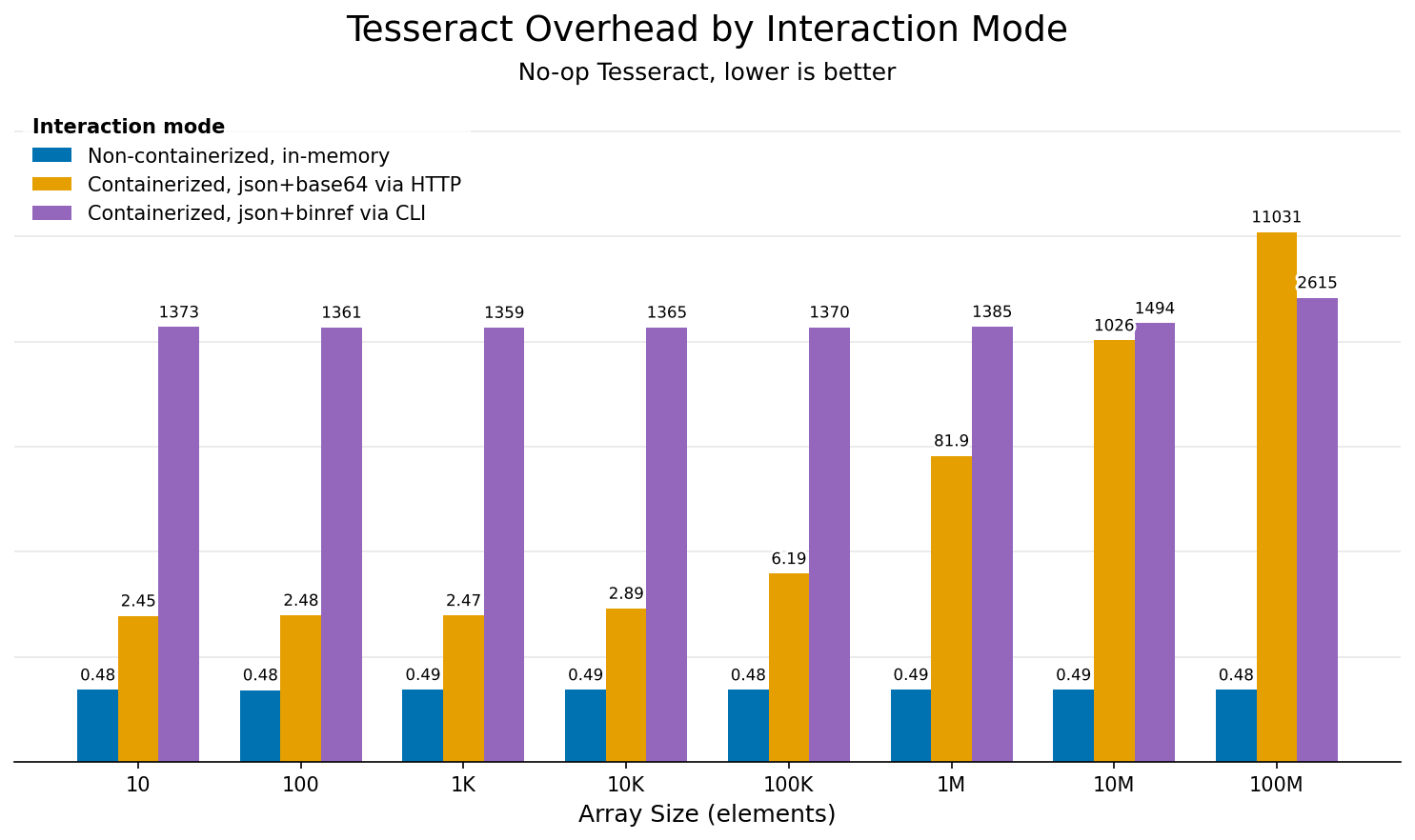
Overhead comparison across interaction modes for different array sizes. Uses a no-op Tesseract that does nothing but decode and encode data, isolating framework overhead.
Mode (color) |
What it measures |
Typical use case |
|---|---|---|
Non-containerized, in-memory (blue) |
Direct Python calls via |
Development, tight loops, performance-critical paths |
Containerized, json+base64 via HTTP (orange) |
Full Docker + HTTP stack, served via HTTP (e.g. |
Production, CI/CD, multi-language environments |
Containerized, json+binref via HTTP (shmem) (green) |
Same HTTP serving path, but arrays are exchanged as |
Same-machine (Linux) workloads on large arrays |
Containerized, json+binref via CLI (purple) |
CLI invocation via |
Shell scripts, one-off runs, pipelines with large data |
Tesseract.from_source is not part of this benchmark. It serves the Tesseract over the same HTTP path as a container, but from a local subprocess, so it skips container startup and Docker’s virtualization layer. Its per-call overhead should be comparable to or lower than that of containerized HTTP.
The guidance chart below puts these numbers in context by showing overhead as a percentage of computation time, for three representative I/O sizes (dotted = 1kB, dashed = 1MB, solid = 1GB). For small data, fixed costs (HTTP roundtrip, container startup) dominate. For large data, transfer and serialization take over.
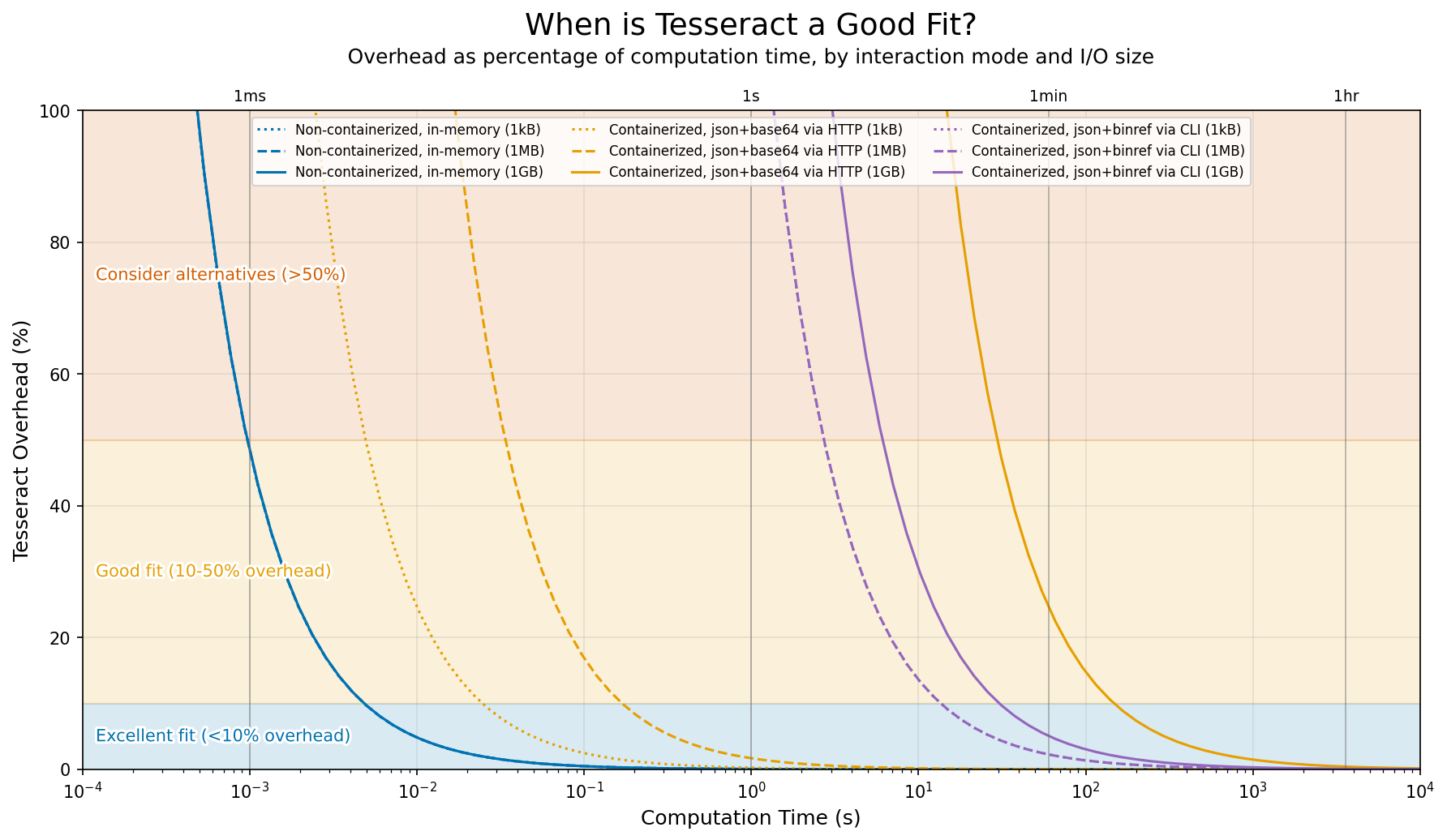
Overhead as percentage of computation time, depending on interaction mode and I/O data size, for the benchmark scenario (local Tesseract with fast network and disk). Some lines overlap where modes have similar performance characteristics: non-containerized usage across all data sizes, and CLI usage for all but the largest data sizes.
Rules of thumb by use case
Warning
Advice in this section is specific to the benchmarking scenario described above. Your mileage will vary based on your setup and workload.
Scenario |
Recommendation |
|---|---|
Second-scale workloads on medium-size data |
The sweet spot for a served Tesseract ( |
A component that needs its own environment, on one machine |
Use |
Development and debugging |
Use |
Cheap operations on small data via HTTP |
HTTP overhead (~2.5ms) can dominate when computation is fast. Batch multiple inputs into a single request. |
Many cheap calls in sequence that can’t be batched |
Examples are MCMC samplers and other iterative methods where each call depends on the previous one. Batching is ruled out, so make each call cheap or drop the process boundary, as described in the short version above. |
Shell scripts and one-off runs |
Each |
Long-running operations on large datasets |
Use the CLI ( |
Cheap operations on huge datasets |
Serialization and transfer will dominate. Try partitioning your workload so each Tesseract call does more compute per byte of I/O, or use binref to avoid redundant data copies between pipeline stages. |
Optimizing performance
1. Choose the right encoding format
Encoding format affects both serialization time and the volume of data transferred. A 10M-element float64 array is ~76MB as raw binary, ~100MB as base64, and ~230-760MB as JSON. If I/O is slow, data transfer dominates over serialization, and choosing a compact format is the most effective optimization.
In short: use base64 (default) for HTTP transport, binref for large arrays or disk-based pipelines, and json only when you need human-readable output. See Array encodings reference for format details and usage examples.
When the client and a served Tesseract share a machine, you can combine HTTP serving with binref on a shared-memory tmpfs to pass large arrays without base64-encoding them into the request body. See Fast same-machine runs with shared-memory binref.
2. Batch small operations
If you have many small operations, batch them into a single request:
# ❌ Avoid: Many small calls
for item in items:
    result = tesseract.apply({"data": item})

# ✅ Prefer: Batch into one call
results = tesseract.apply({"data": np.stack(items)})
Note that your Tesseract’s apply function must be written to accept batched inputs (e.g., arrays with a leading batch axis) for this to work.
3. Reuse Tesseract instances
Starting a Tesseract is expensive: ~2s for a container, and for Tesseract.from_source the time it takes to start Python and import the Tesseract’s dependencies. Reuse instances across calls:
# ✅ Prefer: start once, call many times
with Tesseract.from_source("tesseract_api.py") as tesseract:
    for batch in batches:
        result = tesseract.apply(batch)

# ❌ Avoid: start a new Tesseract per call
for batch in batches:
    with Tesseract.from_source("tesseract_api.py") as tesseract:
        result = tesseract.apply(batch)
If you’re running a script multiple times against the same Tesseract, consider keeping the Tesseract running and connecting via Tesseract.from_url():
# Start once: TESSERACT_API_PATH=tesseract_api.py tesseract-runtime serve --port 8100
# (or, for a built image: tesseract serve my-tesseract --port 8100)
tesseract = Tesseract.from_url("http://localhost:8100")
result = tesseract.apply(inputs)
4. Keep expensive setup out of the call
A served Tesseract imports its tesseract_api.py once at startup and handles every call in that process. Module-level state therefore persists between calls: a model loaded at import time, a cached factorization, or a lookup table stays in memory for as long as the Tesseract runs. This holds for Tesseract.from_source, tesseract serve, Tesseract.from_image, and in-process Tesseract.from_tesseract_api. It does not hold for tesseract run, which starts a fresh container per command.
# ❌ Avoid: reload on every call
def apply(inputs: InputSchema) -> OutputSchema:
    model = load_model("weights.pt")
    return OutputSchema(prediction=model(inputs.x))


# ✅ Prefer: load once when the Tesseract starts
model = load_model("weights.pt")


def apply(inputs: InputSchema) -> OutputSchema:
    return OutputSchema(prediction=model(inputs.x))
The same applies to data that stays constant across calls. Loading it once at module level, instead of sending it with every request, keeps the payload per call small.
Keep in mind:
Each worker has its own copy. With
--num-workersgreater than 1, the server runs several worker processes, and each one imports the module separately. Memory use grows with the number of workers, and a cache filled by one call is not visible to calls that another worker handles.Setup counts toward startup.
Tesseract.from_sourcewaits 30s by default for the Tesseract to become healthy. Raisestartup_timeoutif loading takes longer.State lives only as long as the process. It is lost when the Tesseract restarts, so don’t rely on it for results you need to keep.
5. Profile to find bottlenecks
Enable profiling to see where time is spent:
with Tesseract.from_source(
    "/path/to/tesseract_api.py",
    runtime_config={"profiling": True},
    stream_logs=True,
) as tess:
    tess.apply(inputs)
On the command line, pass --profiling to tesseract-runtime (or to tesseract run for an image):
$ tesseract-runtime --profiling apply '{"inputs": {...}}'
See Profiling in the debugging guide for more usage examples and how to interpret the output.