Tesseract Core documentation
Tesseract wraps any software behind a typed interface with derivative endpoints, runs it in its own process, and hands it to jax.grad or torch.autograd as a single differentiable operation.
New here? Start with the Get started tutorial, or read When to use Tesseract first.
What is a Tesseract?
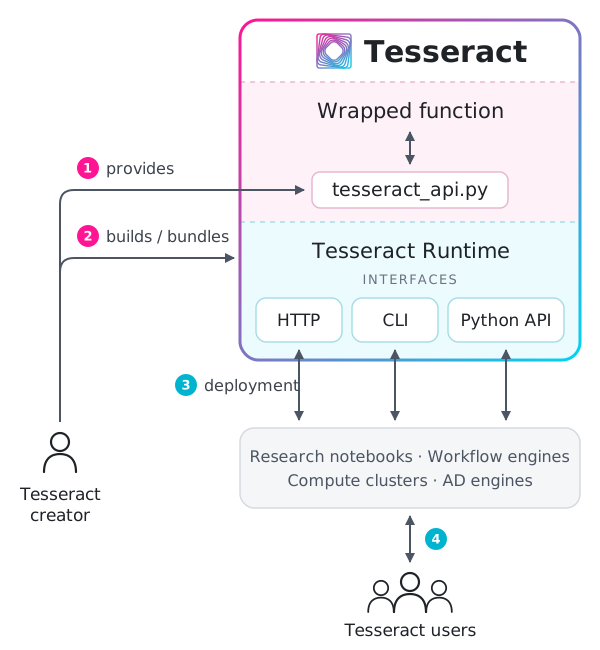
Internal and external interfaces of a Tesseract.
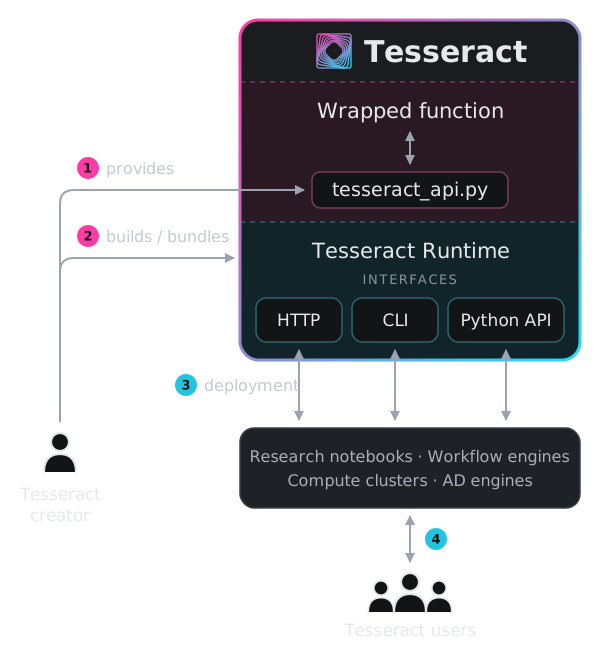
Internal and external interfaces of a Tesseract.
A Tesseract is a component defined in one file, tesseract_api.py:
Schemas declare its inputs and outputs as Pydantic models and mark which fields are differentiable.
applyis the primary entrypoint and wraps whatever software you choose.Derivative endpoints (
jacobian,jacobian_vector_product,vector_jacobian_product) are optional and differentiateapply.abstract_evalreturns the output structure without runningapply. See endpoints for the full list.A process boundary usually separates it from its callers, who reach it over HTTP or through the Python SDK instead of importing it, so it keeps its own interpreter and dependencies.
Design decisions
A few choices shape what working with a Tesseract is like. Each one helps in some settings and limits you in others.
One
applyper Tesseract. A Tesseract exposes a single function, which keeps its interface and gradients easy to reason about. To expose several functions, build several Tesseracts and compose them (see Design patterns).Python as the glue. A Tesseract can wrap software in any language, but the code between the runtime and that software is Python. Every Tesseract gets the same schemas and tooling as a result, and Python projects are the easiest to wrap.
No knowledge of its context. A Tesseract doesn’t know which loop calls it or where it runs. The same component works inside an optimizer, a training loop, or a sampler, and orchestration stays in the calling code.
The workflow
Define the schemas and endpoints in
tesseract_api.py. See Creating Tesseracts and Tips for defining Tesseract APIs.Check every derivative endpoint against finite differences with
check-gradients.Run it in its own environment with
Tesseract.from_source, which needs no Docker, and call it from Python.Compose it into JAX or PyTorch programs with Tesseract-JAX or Tesseract-Torch, or chain several Tesseracts into a pipeline. Differentiable programming basics explains how gradients cross the boundary.
Ship it once it needs to run somewhere else, as a container image built with
tesseract buildor as a remote service reached withTesseract.from_url. See Deploying Tesseracts.
Ways to run a Tesseract
The same tesseract_api.py runs in four ways, without changes:
How |
What it does |
Use it when |
|---|---|---|
Serves it from a local process, in an environment built from its configuration |
You develop it, or call it on your own machine without Docker. |
|
Imports it into your Python process |
Its dependencies fit into your environment. Calls are cheapest, and |
|
|
Builds a container image and serves it from Docker |
You share it with people who don’t have your environment, need system packages or compiled toolchains, or deploy to the cloud. |
Connects to a Tesseract served elsewhere |
It runs on another machine or a cluster, or several programs share one instance (see Deploying Tesseracts). |
Where to go next
Using a Tesseract someone else built: Interacting with Tesseracts
Finding ready-made differentiable solvers: Mosaic, a benchmark suite of physics solvers packaged as Tesseracts
Making calls faster: Performance trade-offs & optimization
Seeing complete examples: Demos & tutorials
Citing Tesseract
If you use Tesseract in your research, please cite:
@article{TesseractCore,
  doi = {10.21105/joss.08385},
  url = {https://doi.org/10.21105/joss.08385},
  year = {2025},
  publisher = {The Open Journal},
  volume = {10},
  number = {111},
  pages = {8385},
  author = {Häfner, Dion and Lavin, Alexander},
  title = {Tesseract Core: Universal, autodiff-native software components for Simulation Intelligence},
  journal = {Journal of Open Source Software}
}